1. Home
  2. Features
  3. Crew Scheduling, Whiteboard & Dispatch
Scheduling, Whiteboard & Dispatch · Three coordinated surfaces

Plan the season, balance the week, run the day.

Three surfaces share one set of jobs — Scheduling lays out the cadence, the Whiteboard balances workload across crews, and Dispatch runs the day-of execution. Dispatching well today literally writes back into the schedule for next week.

Recurrence engine Drag-and-drop Whiteboard Capacity bars per day AI rebalancing OSRM route optimization Apply to future weeks Dispatch notes Crew breadcrumbs Quick Dispatch for storms
A landscape crew gathered before the start of a service day.
What this replaces

Scheduling chaos has a shape — and we built around it.

Most landscape operators run the schedule across three or four tools that don't talk: a paper calendar for the season plan, a whiteboard literally on the wall for tomorrow, group texts for day-of changes, and a spreadsheet someone updates after the fact for billing. Every handoff loses information.

The plan and the day-of don't share a system

The recurrence calendar lives in one app, the whiteboard in another, and the dispatcher's head in a third. When weather hits or a tech calls out, it takes 40 minutes of texting just to know what's still happening.

Today's optimization gets thrown away

Foreman re-orders 14 stops to cut 22 miles of windshield time. Next Tuesday those exact properties hit the schedule again — and the system serves them up in the original arbitrary order. The optimization never compounds.

"Borrow Joe for Friday" turns into a permanent reassignment

You pull a tech from one crew to cover another for one day. Three weeks later he's still assigned to the wrong crew because the system didn't model "borrowed for a date" as different from "permanently swapped." The home crew quietly degrades.

Same Job rows, three time horizons

Which surface for which moment

Each surface manipulates the same underlying Job rows — there's no "schedule a job here, dispatch it over there" double-entry. The split is operational: who's looking at it and how far ahead.

Planning layer

SchedulingAll tiers

Weeks → seasons

The plan: who's supposed to do what, when, in what cadence. Recurrence rules (weekly / biweekly / monthly / quarterly / annual / anytime), 15 service types governed by an explicit job state machine, route-template sequences, and weather-driven auto-holds. A nightly cron materializes future Jobs from your recurrences — deduped so no double-bookings.

Used by: office admins, foremen
Balancing layer

WhiteboardProfessional+

Today → next few weeks

The balance: drag-and-drop work across crews and days. Spot the over- and under-staffed crews from a KPI strip, borrow a tech for a single day without losing the home crew, multi-select a stack and bulk-reassign in a single transaction, or "Edit Day" to bulk-move every Wednesday visit because of weather. AI suggests rebalancing moves you can apply or ignore.

Used by: foremen, dispatchers
Execution layer

DispatchProfessional+

Today (and day-of-event)

The execution: today's events as a flat list with filters, bulk actions, and dispatch-note threads per route plan. OSRM optimizes the day's routes; the foreman locks the order; "Apply to future weeks" writes that sequence back into a route template so next Tuesday's plan starts already optimized. Crew-location breadcrumbs land on a map. Quick Dispatch templates fire 100+ visits in one click for storm response.

Used by: dispatchers, foremen
Whiteboard deep-dive

The dispatcher's one-screen view of the next few days

A drag-and-drop grid: crew columns × date rows. Every cell shows the jobs in that slot plus a per-day effective roster (factoring in borrowed members). Every move emits a single notification rather than scattering events across whatever page made the change.

Drag-and-drop crew × day grid

Columns are crews (plus an Unassigned pseudo-column); rows are dates in the requested window. Single-job drag fires one PATCH; multi-select drag fires an all-or-nothing bulk transaction.

  • 1–200 jobs per bulk move; validates every move first, only then mutates
  • Optimistic UI rollback is clean if any single move fails
  • Reassigning a draft job auto-promotes it to scheduled
  • Completed and cancelled jobs are immutable — re-dragging returns 409 (no silent un-archiving)

Capacity bars + KPI strip

Per-cell scheduled-vs-capacity bars roll up each member's shift_minutes. The headline KPI strip uses the same query path as the grid, so the numbers always match the cards on the page.

  • Status buckets: overstaffed (>100% util), understaffed (<70%), balanced, idle
  • Per-crew chips for click-to-drill — colour, scheduled / capacity minutes, borrowed-today count
  • Org-wide totals: scheduled minutes, capacity minutes, unassigned count + minutes
  • Holiday banners overlay any date matching the org's WorkCalendar rules

Borrow vs. permanent swap

Two distinct flows for two distinct realities. Same-day Whiteboard borrows are honoured by job creation, so a job created mid-day on the borrowing crew picks up the borrowed user automatically.

  • Borrow: lend a user to another crew for a single date; home CrewMember row stays put
  • Permanent swap: rewrites the home crew effective from a date, with an audit-log row
  • Unique-per-(user, date) constraint means borrow + swap collisions raise 409 instead of silently overwriting
  • The audit log of borrows + swaps is queryable for any date window

Edit Day — bulk weather moves

A single transaction that mirrors LMN's "Edit Crew Schedule" affordances. move_all / move_incomplete re-date every visit (or only non-completed ones) to a new date, optionally re-crewing at the same time.

  • Wall-clock time-of-day is preserved on the new date; scheduled_end shifts by the same delta
  • delete_incomplete soft-cancels via the job state machine — in-progress jobs are skipped so a midday weather call doesn't blow up active work
  • The Unassigned pseudo-column is targetable too — clear a column of leftovers in one call
  • Every action emits a single notification per affected job, not one per layer

"Optimize Day" → Dispatch handoff

One click on a (crew, date) finds-or-creates that day's route plan and runs OSRM over its stops. Successful runs flip the plan to optimized and redirect the dispatcher to /dispatch?route_plan_id=… — Whiteboard's job is done; Dispatch takes it from here.

  • Stops reseed from every job assigned to the crew that day with mapped property coordinates
  • Service duration uses the job's scheduled window (5-minute floor); falls back to 60 minutes if unscheduled
  • Plans already in locked / in-progress / completed return 409 — unlock first
  • Fuel cost reads from organization.settings.fuel_cost_per_mile (default $0.20)

Schedule settings, per org

A handful of preferences that change how cards render and how the grid colours itself. Manager-gated; takes effect for everyone in the org.

  • Visit-naming tokens: compose a card title from customer / service / task / property / job when the job has no description
  • Capacity-bar toggle: hide the per-cell scheduled-vs-capacity bars if you want a denser grid
  • Colour-by-calendar: colour cards by their Work Calendar tag instead of by job state
  • Tier gate is layered ahead of the role gate — Starter orgs hit a clean 403 before the request reaches the data layer
AI scheduling assistant

Suggestions you approve — never autonomous mutations

Claude proposes; the dispatcher disposes.

The assistant asks Claude (via LiteLLM) for ranked moves that would balance the day. The model never mutates anything — it returns a structured drawer of suggestions, and the dispatcher picks which to apply. Suggestions cite the specific over- and under-staffed crews so the reasoning is legible.

  • Every job ID and crew ID the model returns is validated against the input grid before reaching the response — per the project-wide "LLM output is untrusted" rule
  • LLM timeout, schema violation, or provider 5xx degrades to a deterministic stub so the drawer always renders something — never a 503 mid-day
  • Suggestions are read-only until the dispatcher applies them — the model can't queue moves in the background
  • The same suggestion drawer surfaces on the Whiteboard, so the dispatcher doesn't context-switch to act on its output
Dispatch deep-dive

The day-of operational surface

Where the Whiteboard balances the next few weeks, Dispatch shows what's happening today and lets you act on it in real time. A single page with an Events / Plans segmented toggle — defaults to Events, the workflow most operators live in.

Events list with bulk actions

A flat list of every visit, meeting, and to-do for the selected date range with filters (crew, employee, state, search). Rows arrive denormalized with customer / property / crew names + colour so the table doesn't follow up with N queries.

  • Bulk: complete · reopen · move (preserves wall-clock time) · duplicate · assign crew · assign employee
  • Errors are per-row — one failure doesn't abort the batch; UI gets succeeded/failed split for retry
  • delete refuses for in_progress / completed / storm_active (409)
  • Cross-org isolation joins customers/properties on organization_id rather than trusting FKs alone

Dispatch notes — collaborative thread per plan

A persistent thread attached to each route plan. Foreman, assigned crew, and the office can post and reply; threaded with in_reply_to_id; one push notification per note (not one per surface).

  • Field-crew+ can post — the crew talks back, not just the office
  • Author names, timestamps, and reply chains all preserved with the plan
  • The note thread becomes the audit trail of "what happened on this route"
  • Notifications fan out as a single dispatch_note_added event — no notification spam

Crew-location breadcrumbs on a map

One row per crew user with their most recent position within a configurable window — drawn from whichever source fired most recently: an active GPS ping, a clock-in, or a clock-out. Older positions are dropped.

  • Powers the Plans view's map overlay alongside the OSRM-optimized route line
  • Window is configurable per request (defaults to 12 hours)
  • Foreman+ only — keeps location data out of office-staff and sales-rep views
  • No background polling — uses the data sources crews are already creating during the day

Sequence lock + "Apply to future weeks"

The optimized stop order isn't a one-time win. Locking it writes a CrewRouteTemplate with a recurrence — every-week or every-other-week, anchored to the plan's Monday. Next time the same properties hit a route plan for that crew, the stored sequence overrides OSRM's heuristic.

  • Per-(crew, property) row keyed by sequence; existing templates for the same set are deleted first — most-recent locked sequence wins
  • Biweekly templates anchor to the Monday of the original plan's date so they only fire on the right weeks
  • Today's optimization becomes every Tuesday's optimization — windshield time compounds the right way
  • Foreman+ to apply; the field crew can't accidentally lock a sequence from a half-finished route
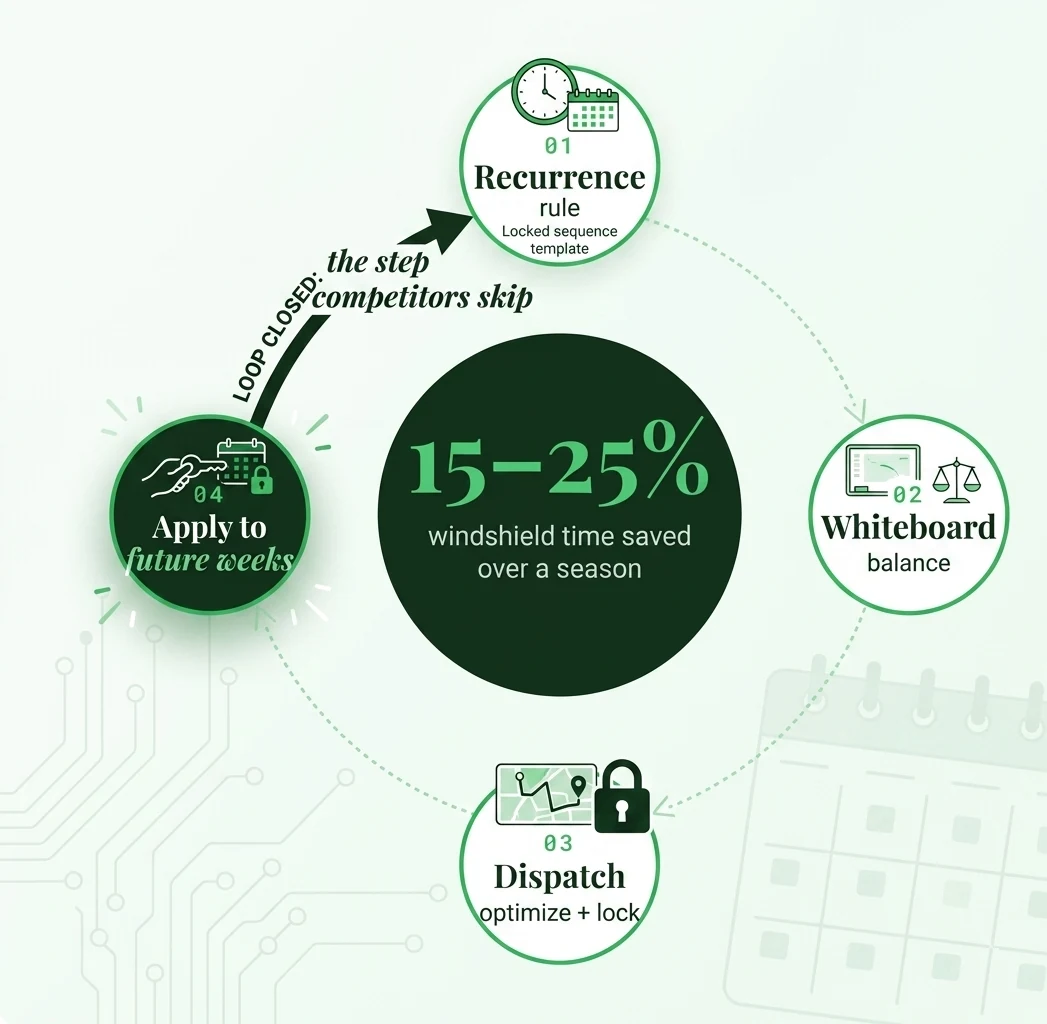
The efficient-scheduling flywheel

The work you do today saves you setup tomorrow

Most scheduling tools throw the day's optimization away the moment the day ends. We write it back into the recurrence so the next time those same properties land on the same crew, the route plan already knows the order — and the only work left is filling in the new date.

Recurrence → Whiteboard → Dispatch → back to Recurrence

The four steps below run on a loop. Step 4 is the one most competitors skip — and the reason they leave 15–25% of windshield time on the table over a season.

01

Recurrence rule

Weekly / biweekly / monthly / quarterly / annual / anytime. The nightly cron materializes Jobs onto future dates.

02

Whiteboard balance

Foreman drags, borrows, edits-day, and applies AI suggestions to land workload on the right crews.

03

Dispatch optimize

"Optimize Day" runs OSRM and the foreman locks the sequence. The route plan flips to optimized, then locked.

04

Apply to future weeks

The locked sequence writes a CrewRouteTemplate. Next Tuesday's plan for those properties starts already optimized — no re-work.

Quick Dispatch · the storm-day surface

"Schedule 100 visits in one click" — built for snow events

Dispatch's Quick Dispatch templates are the rapid-deploy surface used during storm and snow events. You pre-build a template (crew + service + a list of customer properties), and during the storm a single deploy call materializes one Job per property for a target date. Templates live forever; deploying doesn't consume them.

Quick Dispatch pairs with Snow Ops

If you run snow, Quick Dispatch is what turns an NWS winter-storm warning into 100+ deployed visits in one POST. Deployed Jobs land on the Whiteboard and immediately appear in Dispatch's Events view — no separate storm calendar. Pairs natively with Snow Ops salt-usage logging and one-click event billing.

See Snow Ops
What's on which plan

Core scheduling everywhere; Whiteboard & Dispatch on Pro+

Recurrences, the calendar, weather integration, and route templates are on every plan. The drag-and-drop Whiteboard, the Dispatch board, Quick Dispatch templates, and the AI scheduling assistant unlock at Professional. Multi-location branch scoping is Enterprise.

Capability Starter Professional Enterprise
Recurrence engine + 15 service types
NWS weather integration + auto-holds
Drag-and-drop Whiteboard + KPI strip
AI scheduling assistant
Dispatch board + bulk actions + dispatch notes
OSRM route optimization + "Apply to future weeks"
Quick Dispatch templates (storm rapid deploy)
Multi-location branch scoping for every view
Questions we hear

Scheduling, Whiteboard & Dispatch FAQ

What's the difference between Scheduling, Whiteboard, and Dispatch?
They're three coordinated surfaces that all manipulate the same Job rows at different time horizons. Scheduling is the planning layer — recurrence rules, season windows, weather auto-holds. The Whiteboard is the balancing layer — drag-and-drop work across crews, borrow members, bulk-move a stormed-out day. Dispatch is the execution layer — today's events, route optimization, dispatch notes, crew breadcrumbs, Quick Dispatch templates for storm rapid deploy.
What plan do I need for the Whiteboard and Dispatch?
Core Scheduling (recurrences, calendar, weather integration) is on every plan, including Starter. The Whiteboard, Dispatch board, Quick Dispatch templates, and route templates are gated to Professional and up. Enterprise adds multi-location branch scoping that filters every Whiteboard and Dispatch view to the user's assigned branches.
How does "Apply to future weeks" work?
When a foreman optimizes a route plan in Dispatch and locks the sequence, they can post the optimized order to a CrewRouteTemplate with a recurrence (every week or every other week, anchored to the plan's Monday). The next time the same set of properties lands in a route plan for that crew, the stored sequence overrides OSRM's heuristic. Today's optimization becomes every Tuesday's optimization — dispatching well today literally saves you scheduling work next week.
Can the AI scheduling assistant move jobs on its own?
No. The assistant is suggestion-only — it asks Claude (via LiteLLM) for ranked rebalancing moves and returns them as a structured drawer. The dispatcher decides which to apply. Every job ID and crew ID the model references is validated against the input grid before the response is rendered (per the project-wide "LLM output is untrusted" rule). If Claude times out or returns malformed JSON, the drawer falls back to a deterministic stub so the page never blocks on AI.
What's Quick Dispatch and when do I use it?
Quick Dispatch templates are the "schedule 100 visits in one click" surface used during storm and snow events. You pre-build a template (crew + service + a list of customer properties), and during the storm a single deploy call materializes one Job per property for a target date. Templates live forever; deploying doesn't consume them. The deployed jobs land on the Whiteboard and immediately appear in Dispatch's Events view for the target date.
Can I borrow a crew member without permanently reassigning them?
Yes — the Whiteboard's borrow flow lends a user to another crew for a single date. The home CrewMember row stays put; the borrow writes a CrewMemberAssignment with a borrowed-from attribution that shows on both the lending and borrowing crews' columns. Same-day borrows are also honored at job creation, so a job created mid-day on the borrowing crew picks up the borrowed user automatically. There's also a permanent-swap flow for reorganizations — that one rewrites the home crew effective from a date and drops an audit-log row.
Get started

See the three surfaces run on a real week

30-minute walkthrough — bring your current schedule and we'll set up a live week with your real crews, real properties, and a storm-day Quick Dispatch run.